Using Loops in Claude Code
This week I came across the concept of “claude code loop” which I was not aware of.
Basically it is a term coined by Geoffrey Huntley which describes it as a “Ralph is a Bash loop” - a development methodology based on continuous AI agents loops .
Ralph in this case is named after Ralph Wiggum from The Simpsons, which represents the philosophy of persistent interactions despite setbacks.

Ralph Wiggum Plugin
Claude code loop is implemented as a plugin named “Ralph Wiggum Plugin” at https://github.com/anthropics/claude-plugins-official/tree/main/plugins/ralph-wiggum.
In my case, I use the plugin to create an MCP server for my simple REST API for managing TODO items built with FastAPI and SQLAlchemy.
But before we check the results, lets look at how to install and use the Claude Code Ralph Wiggum Plugin.
How to install the plugin
**Install ralph-wiggum plugin:**
 /plugin install claude-plugins-official/ralph-wiggum

 **Remove ralph-wiggum plugin:**
 /plugin remove ralph-wiggum

**Alternative installation method:**
 You can also use the interactive installer which will show available plugins:
  /plugin install
How to use the plugin
The basic concepts are:
# You run ONCE:
/ralph-loop "Your task description" --completion-promise "DONE"

# Then Claude Code automatically:
# 1. Works on the task
# 2. Tries to exit
# 3. Stop hook blocks exit
# 4. Stop hook feeds the SAME prompt back
# 5. Repeat until completion
I used it to add an MCP Server using the following instructions.
/ralph-loop "Implement my first MCP server using FastAPI-MCP for my REST API for TODOs.

When complete:
- Make use of the fastapi_mcp package in https://github.com/tadata-org/fastapi_mcp. A detailed fastapi_mcp documentation is at https://fastapi-mcp.tadata.com/getting-started/welcome.
- All CRUD operations as MCP tools.
- MCP server will be used to interact with REST API to create/delete/show/update TODOs.
- Make sure error handling is done properly.
- MCP_README documenting how to use it.
- Output: <promise>COMPLETE</promise>" --completion-promise "COMPLETE" --max-iterations 20
:dollar: After $1.55 , I got the following output from claude code.
 The MCP server implementation is complete. Here's a summary of what was accomplished:

Summary

  Implementation Complete

  1. Installed FastAPI-MCP: Added fastapi-mcp package (v0.4.0)
  2. Modified main.py:
    - Added FastApiMCP import
    - Added operation_id to all CRUD endpoints for clear tool naming
    - Initialized MCP server with appropriate configuration
    - Mounted MCP server at /mcp using HTTP transport
    - Fixed uvicorn startup to use string import for proper route registration
  3. MCP Tools Available:
    - create_todo - Create a new todo item
    - list_todos - List todos with filtering/pagination
    - get_todo - Get a specific todo by ID
    - update_todo - Update an existing todo
    - delete_todo - Delete a todo by ID
  4. Created MCP_README.md: Comprehensive documentation including:
    - Installation instructions
    - Server startup guide
    - All 5 MCP tools with parameters and examples
    - Client configuration for Claude Desktop and Cursor
    - Error handling documentation
    - Example workflows
    - Development guide for adding new tools
  5. Error Handling: Inherited from the REST API with proper HTTP status codes (400, 404, 422, 500)
  6. Testing: All 38 existing tests pass, and manual testing with curl confirms MCP functionality works correctly

  COMPLETE
And here a detailed information on cost.
> /cost --session 4
  ⎿  Total cost:            $1.55
     Total duration (API):  2m 29s
     Total duration (wall): 21m 46s
     Total code changes:    0 lines added, 0 lines removed
     Usage by model:
             claude-haiku:  695 input, 97 output, 0 cache read, 0 cache write ($0.0012)
         claude-3-5-haiku:  4 input, 387 output, 0 cache read, 2.1k cache write ($0.0037)
          claude-opus-4-1:  58 input, 2.4k output, 43.1k cache read, 69.6k cache write ($1.55)
Using MCP to interact with my TODO List
In order to use the MCP server in claude code, we need to add the following configuration in the .claude/settings.json file.
{
  "mcpServers": {
    "todo-api": {
      "type": "http",
      "url": "http://localhost:8000/mcp"
    }
  }
}
Or simply run the command:
claude mcp add todo-api http://localhost:8000/mcp --transport httpOnce the mcp server is configured in claude code, we can use the newly created MCP tools in our claude code conversations:
- “Use the todo MCP server to create a new todo called ‘Test MCP Integration’”
- “List all pending todos using the MCP server”
- “Mark todo ID 1 as complete”
- “Delete todo ID 2”
Creating my first task through MCP
Here is the request I did to claude code.
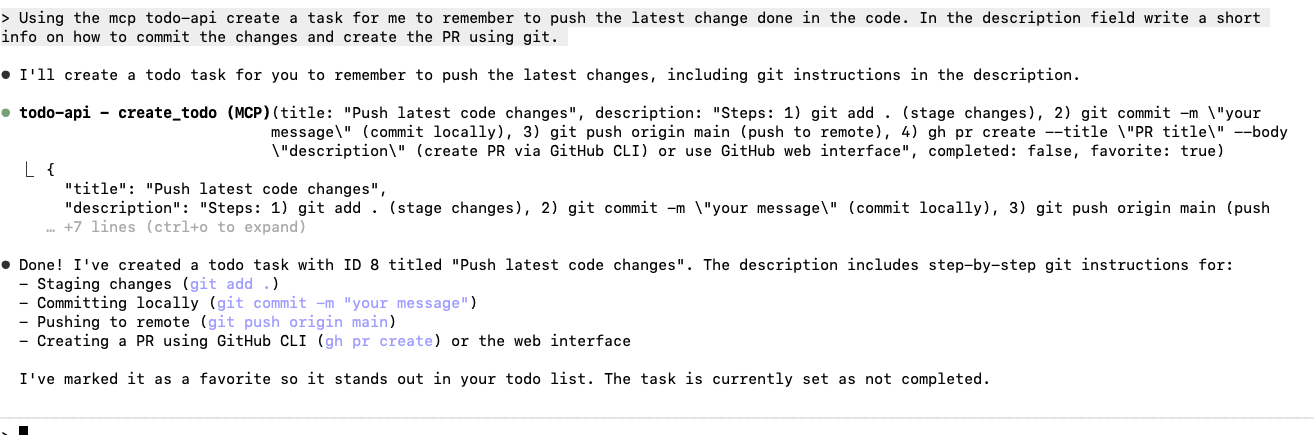
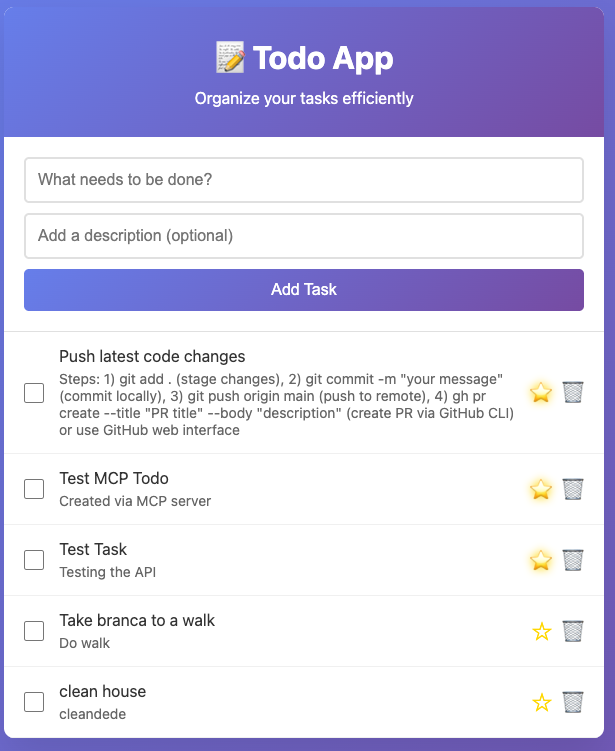
And here the task “Push latest code changes” added to the TODO list.
Claude Code Transcripts
I am a new user of claude code using CLI (command line). Sometimes I find it useful to check what the agent has done as a way to learn from the agent during task execution. In particular, when using /ralph-loop where the idea is to have claude code to develop the whole task in a loop with minimum interuption.
In order to do it I came across the claude-code-transcripts from Simon Willison, which is a Python CLI tool that converts claude code sessions to HTML pages that can be shared through Github Gists.
You can run using:
uvx claude-code-transcriptsTo generate Github gist, make sure you have the github authentication and run the command:
uvx claude-code-transcripts --gist

# Or if you have installed it through "uv tool install claude-code-transcripts"
claude-code-transcripts --gist
The result is the converted claude code session files to clean HTML pages with pagination. Thanks to Simon Willison.
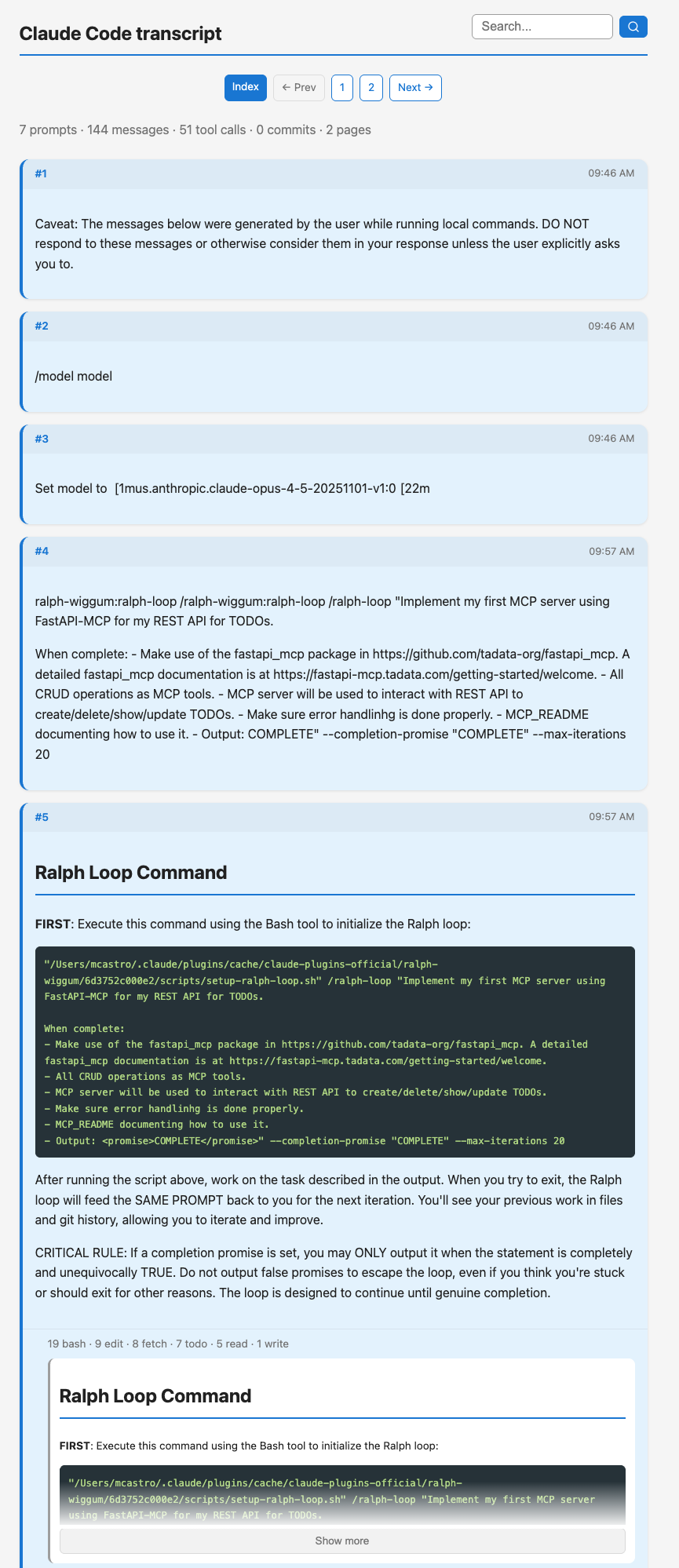
Check the complete Claude Code sessions at https://gisthost.github.io/?afd5c714ea23979f214903d36bae8012/index.html
Additional claude code transcripts: